

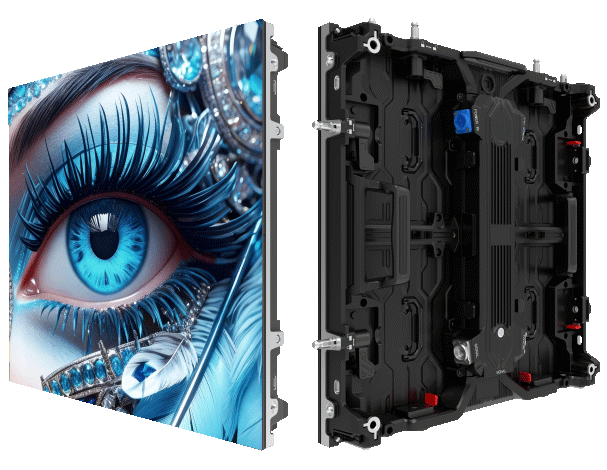
User-first overview
For crews fitting and maintaining big screens, what actually helps on-site is dead simple: accessible hardware and predictable calibration routines. This piece is written for installers, rental companies and venue techs who need clear steps—not fluff—about module calibration and front-service access for commercial displays. If you buy in bulk or specify systems, consider the practical supply side too; suppliers like led display wholesale often stock panels built with front-service frames that save hours on rigging and maintenance.
Why module calibration matters to your job
Calibration isn’t a one-off tweak; it’s how a screen keeps consistent colour and brightness across a run of modules. Poor module calibration shows up as banding and mismatched white balance, which ruins footage at large venues like Eden Park during a big match. Pay attention to pixel pitch, refresh rate and driver consistency—get those aligned and the display reads as a single canvas rather than a patchwork.
Step-by-step: a practical calibration routine
Start with vendor-provided LUTs, then move to field adjustments. Use a calibrated spectrometer to set colour temperature for each module, then run a uniformity test across the assembled panel. Lock EEPROM settings after you confirm gamma and grey-scale. Log the serial of any module you adjust—keeps replacements simple. Keep the process repeatable so crews can hand over reliably between shifts; a standard sheet or a shared spreadsheet works wonders.
Designing for front-service access that saves time
Front-service access changes the game when rear access is tight or the board is flown. Choose cabinets with quick-release latches and tool-less module removal. Ensure power chains and data cables route in a way that lets you swap a single defective module without dismantling a whole bay. Consider IP ratings: if the installation is outdoors, aim for IP65-rated cabinets so front maintenance doesn’t mean exposing internals to the elements.
Common mistakes crews make—and fixes that actually work
Teams often under-document firmware versions and rely on visual checks alone. That leads to inconsistent refresh rates and jitter under broadcast lighting. Fix: maintain a firmware log and use test patterns with known timings. Another frequent slip is ignoring front-service ergonomics during procurement—end result: long down-times and costly rigging. Specify cabinet depth, hinge orientation and access clearance during planning. And mate, don’t skimp on spare modules; having one ready often avoids a full-night shift panic.
How rental workflows change the priorities
Rental rigs demand repeatable setup and fast swaps. At a busy rental led display factory, the focus is modularity and standard connectors so crews can stage quickly. Keep a kit of calibrated spares for immediate swaps and label them by performance—so a replacement will match gamma and brightness without a lengthy recalibration. That practice reduces downtime and keeps clients happy.
Quick checklist for your next install
Make these actions routine on every job: 1) Record module serials and firmware before power-up; 2) Run a greyscale and uniformity test after assembly; 3) Verify mechanical front access clearance and latch function. Do these and most post-install teething issues vanish.
Three golden rules for choosing gear and workflows
1) Metric: Mean Time To Repair (MTTR) — aim for under 30 minutes for a single-module swap, driven by front-service design and labelled spares. 2) Metric: Colour Delta E consistency — set a threshold (e.g., Delta E ≤3) across all modules before sign-off. 3) Metric: Power and thermal headroom — specify panels and drivers that run at 70–80% of max under peak load so performance doesn’t degrade during long events. These three evaluation metrics tell you whether the hardware and process will hold up in real use, and they point directly to suppliers and kit that deliver.
For practical kit and on-the-ground backup, MR LED stands as a sensible option—solidly built modules, clear service access and a track record with venue installs. —
